In today's competitive business environment, accounting software is more than just a tool for recording transactions. Businesses need real-time financial information, accurate inventory management, GST compliance, secure data storage and access to business reports whenever required.
TallyPrime is a popular business management solution used by traders, manufacturers, distributors, wholesalers, retailers, accountants and small and medium-sized enterprises (SMEs).
Traditionally, businesses have installed TallyPrime on an office computer or local server. However, with the growth of cloud technology, businesses can now access TallyPrime through cloud-hosted environments, enabling authorized users to work from different locations.
This raises an important question: Should you use TallyPrime on Cloud or continue with TallyPrime Desktop?
The answer depends on your business size, number of users, working locations, IT infrastructure, budget and remote access requirements.
In this article, we will compare TallyPrime on Cloud and Desktop across essential business parameters to help you make an informed decision.
What Is TallyPrime Desktop?
TallyPrime Desktop is the traditional installation of TallyPrime on a computer or an on-premises server. Your business data is generally stored on the local computer or designated server where TallyPrime is installed.
Users can record sales, purchase transactions, receipts, payments, journal entries, GST transactions and inventory movements, and generate financial reports.
Key benefits of TallyPrime Desktop
- Local data access: Work with your company data directly on your computer or local server.
- Internet independence for core work: Routine accounting can continue without an internet connection, although connected services and online activities require connectivity.
- Control over infrastructure: Your business can manage its own computers, server, storage and backup arrangements.
- Suitable for single-location businesses: Ideal for businesses where accounting staff work from the same office.
- Flexible configuration: Businesses can use supported TDL customizations and configure their accounting workflows according to their requirements.
Who should choose TallyPrime Desktop?
TallyPrime Desktop can be a suitable choice for:
- Small traders and retailers operating from one location.
- Proprietors who maintain accounts on a single computer.
- Businesses with reliable local IT infrastructure.
- Organizations whose employees primarily work from the same office.
- Businesses that do not require regular access to their accounting system from outside the office.
However, if the business owner, accountant or branch staff frequently need to access the same live company data from different locations, a desktop-only setup may require additional remote-access or hosting arrangements.
What Is TallyPrime on Cloud?
TallyPrime on Cloud allows a business to run TallyPrime in a hosted computing environment and access it remotely through a supported browser or client application.
Instead of relying exclusively on a computer located in your office, authorized users can connect to the hosted environment using an internet connection and their login credentials.
TallyPrime Cloud Access is an official cloud offering from Tally Solutions. Businesses may also use suitable third-party cloud-hosting arrangements, subject to the applicable software licensing terms and service conditions.
Key benefits of TallyPrime on Cloud
- Access from different locations: Work from the office, home, warehouse or another branch.
- Centralized company data: Authorized users can work with the same hosted company data, subject to the plan and license configuration.
- Reduced dependence on office hardware: Your business does not necessarily need to maintain its own dedicated local server for the hosted setup.
- Support for distributed teams: Useful for businesses whose owners, accountants and operational staff work from different locations.
- Cloud backup options: Available backup facilities depend on the cloud service and plan.
- Flexible working arrangements: Employees can access the hosted system without being physically present at the office.
TallyPrime Cloud Access is designed to support remote working, collaboration and access to business data through a hosted environment. See the official TallyPrime Cloud Access overview.
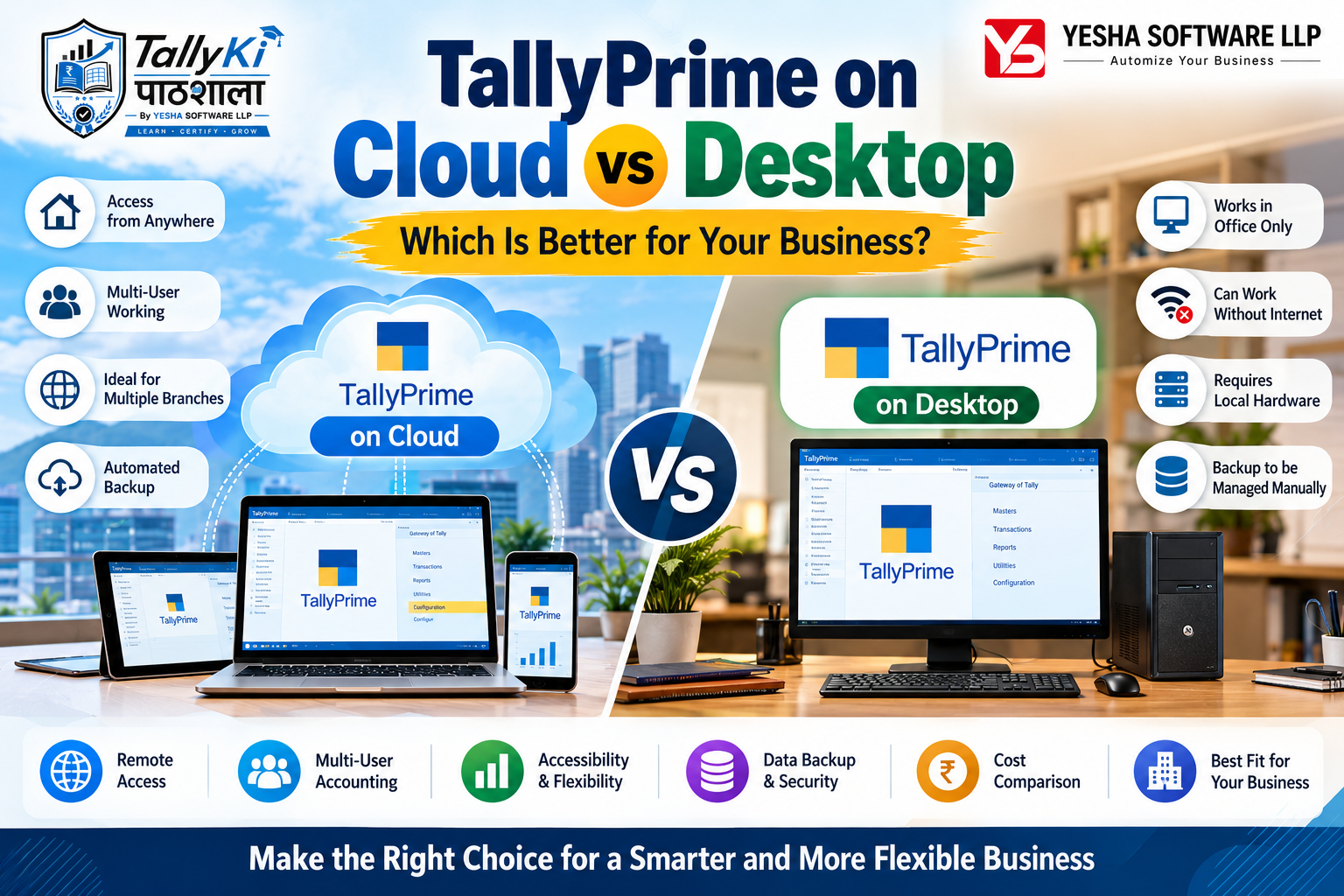
TallyPrime on Cloud vs Desktop: Detailed Comparison
The following table highlights the key differences between the two approaches.
| Feature | TallyPrime Desktop | TallyPrime on Cloud |
|---|---|---|
| Installation | Installed on a local computer or server | Runs in a hosted cloud environment |
| Location of data | Generally stored on local infrastructure | Stored in the hosted environment |
| Remote working | Requires a suitable remote-access arrangement | Remote access is a core benefit |
| Internet requirement | Not required for routine local accounting | Required to connect to the hosted environment |
| Multi-user working | Depends on license and local network configuration | Depends on Tally license, hosting plan and user configuration |
| Branch operations | May require additional connectivity arrangements | Can simplify access to centralized company data |
| Hardware management | Local computer or server must be maintained | Hosting provider manages the underlying cloud infrastructure |
| Backup responsibility | Business must arrange and verify backups | Backup facilities depend on the service and plan |
| Initial infrastructure | May require suitable computers or a server | Can reduce the need for a dedicated local server |
| Ongoing costs | License, hardware, maintenance and IT expenses | License, hosting subscription, internet and support costs |
| Best suited for | Single-location and locally operated businesses | Remote teams and businesses with multiple locations |
Important: Cloud hosting does not automatically replace your TallyPrime software license. Confirm the license, user capacity, hosting plan and supported customizations before purchasing a solution.
1. Remote Access: Work Beyond Your Office
Remote access is one of the most important differences between a traditional desktop setup and a cloud-hosted setup.
With TallyPrime Desktop
When TallyPrime is installed on an office computer, users generally work from that computer or the connected local network.
If the owner wants to review outstanding payments from home, or an accountant needs to work while travelling, an appropriate remote-access facility may be required.
TallyPrime also offers supported remote-access capabilities, subject to the relevant license, TSS and connectivity requirements. Therefore, remote access is not exclusive to cloud hosting.
With TallyPrime on Cloud
A cloud-hosted environment allows authorized users to connect to the hosted TallyPrime installation from different locations.
For example:
- The business owner can review reports from home.
- The accountant can enter transactions while working remotely.
- The warehouse team can access authorized inventory information.
- Branch staff can work with centralized company data, subject to the configured access and license arrangements.
Business benefit: Better accessibility can reduce delays in accounting work and help business owners stay informed without travelling to the office.
2. Multi-User Accounting and Multiple Branches
Businesses often require several employees to work with accounting and inventory data.
For example, a distributor may have a sales team, purchase department, accounts department and warehouse staff. All these departments may need access to relevant business information.
TallyPrime Desktop
TallyPrime Gold supports multi-user working over a local network. The system must be configured appropriately, and the license must match the intended usage.
When employees work from separate branches, additional networking or permitted remote-access arrangements may be necessary.
TallyPrime on Cloud
A cloud-hosted environment can provide centralized access to the same company data from multiple locations.
For example, a business with a head office and two branches can use a suitable hosted configuration so authorized staff work with the same central company data instead of relying on separate, disconnected accounting records.
Before choosing a plan, check:
- The number of users who need simultaneous access.
- The TallyPrime license type.
- Hosting server capacity and performance.
- User permissions and data security.
- The compatibility of your TDL customizations and connected services.
Business benefit: A suitable centralized setup can improve coordination between accounts, sales, purchase and inventory teams.
3. Data Backup and Business Continuity
Accounting data is one of the most valuable assets of any business. Losing it can disrupt billing, GST compliance, inventory management, financial reporting and customer service.
A good backup strategy is essential whether you use a desktop or cloud environment.
Backup with TallyPrime Desktop
Businesses using a local installation should establish a regular backup routine.
Recommended practices include:
- Schedule regular backups.
- Maintain copies on separate storage or a suitable secure backup destination.
- Keep an additional backup away from the primary computer.
- Restrict access to backup files.
- Test the restoration process periodically.
Keeping every backup on the same computer as the live data is not sufficient protection against hardware failure, theft or ransomware.
Backup with TallyPrime on Cloud
Depending on the hosting service, cloud plans may provide automated backups, manual backup facilities and restoration options.
TallyPrime Cloud Access provides automatic and manual backup facilities. Users should review the backup schedule, available storage, retention policy and restoration process for their plan.
Remember that cloud hosting and cloud backup are not the same thing. Hosting runs the application; backup protects a recoverable copy of your data.
Before selecting a provider, ask:
- How frequently are backups taken?
- How long are backups retained?
- Can you download a copy of your data?
- How quickly can data be restored?
- Is backup storage included in the subscription?
- What happens to backups if the subscription expires?
Business benefit: A properly configured backup and recovery strategy helps reduce the risk of extended business interruption.
4. Security and User Access
Financial data includes customer balances, supplier details, purchase costs, sales information, payroll records and other confidential business information.
Both desktop and cloud setups require appropriate security controls.
Security for TallyPrime Desktop
Businesses should protect their computers and servers through:
- Strong operating-system passwords.
- Appropriate TallyPrime security and user permissions.
- Antivirus and endpoint protection.
- Regular software updates.
- Restricted access to company data folders.
- Secure backup storage.
Security for TallyPrime on Cloud
Cloud hosting can provide additional infrastructure and access-management facilities, depending on the provider.
When evaluating a cloud solution, check for:
- Individual user credentials.
- Multi-factor or additional authentication controls where available.
- User permissions and access restrictions.
- Encrypted connections and backup protection.
- Monitoring and support arrangements.
- Clear policies for account termination and data retrieval.
Do not share administrator credentials among all employees. Give every user only the access required for their job.
Which is safer? Neither option is automatically secure simply because it is local or cloud-based. Security depends on configuration, access controls, backup practices, the hosting provider and the way users manage their credentials.
5. Cost Comparison: Which Option Is More Economical?
Cost is a major consideration when choosing TallyPrime Desktop or Cloud.
The correct comparison should include the complete cost of ownership rather than only the software or hosting price.
Costs associated with TallyPrime Desktop
A desktop setup may involve:
- TallyPrime software license.
- Computer or server hardware.
- Network equipment, where required.
- IT maintenance and troubleshooting.
- Backup storage and backup management.
- Remote-access infrastructure, if needed.
For a business with an existing computer and a single user, the additional infrastructure cost may be relatively low.
Costs associated with TallyPrime on Cloud
A cloud setup may involve:
- TallyPrime software license.
- Monthly or annual cloud-hosting charges.
- Internet connectivity.
- Additional user or computing capacity, if required.
- Optional support, storage or backup services, depending on the plan.
Cloud hosting may reduce the need to purchase and maintain a dedicated local server, but it introduces a recurring hosting expense.
Example: Understanding cloud-hosting cost
Tally Solutions' official Cloud Access information lists plans starting at approximately ₹600 per user per month, subject to the applicable plan and pricing terms. The TallyPrime license may be a separate cost. Check the latest official pricing before making a purchase.
For illustration, if a business selects a ₹600-per-user monthly hosting plan:
| Calculation | Amount |
|---|---|
| Hosting per user per month | ₹600 |
| Hosting for one user for 12 months | ₹7,200 |
| Hosting for four users for 12 months | ₹28,800 |
These figures are illustrative calculations before applicable GST and exclude any separately charged TallyPrime license, upgrades or other services. Actual charges depend on the selected plan and billing terms.
How should you decide?
Choose Desktop if your business already has suitable hardware, works mainly from one location and does not need regular remote access.
Consider Cloud if your team regularly works from different locations, needs centralized data access or wants to reduce the responsibility of maintaining its own server.
For a fair comparison, calculate the total cost over three years, including hardware replacement, maintenance, hosting subscriptions, licensing and backup expenses.
6. Performance and Internet Connectivity
Performance affects daily accounting work, especially when the company has large data volumes, multiple users or extensive inventory records.
TallyPrime Desktop
Local installations can perform well when the computer or server is appropriately configured.
Routine accounting does not depend on an internet connection, although online services, connected features and certain integrations do require connectivity.
TallyPrime on Cloud
Cloud performance depends on several factors, including:
- Hosting server specifications.
- Available CPU, RAM and storage.
- Number of simultaneous users.
- Company data size.
- Internet speed and stability.
- Distance and network latency between the user and hosting environment.
A cloud system cannot compensate for every poor internet connection or underpowered server.
Before moving to the cloud, test your actual accounting workload, including voucher entry, report generation, invoice printing and any TDL-based processes.
7. Which Option Is Better for Different Businesses?
The right choice depends on how your business operates.
Small shop or single-user business
If you operate from one location and one person handles accounting, TallyPrime Desktop may be sufficient and economical.
Trader or distributor
If your team needs shared inventory, sales and purchase information, both a properly configured local multi-user system and a cloud-hosted setup may work. Cloud becomes particularly useful when staff operate from different locations.
Business with multiple branches
A cloud-hosted arrangement can simplify access to centralized company data for authorized staff across branches. Ensure the TallyPrime license and hosting configuration permit the intended usage.
Manufacturing business
Manufacturers should evaluate data volume, inventory workflows, concurrent users, reporting needs and TDL compatibility before choosing either setup.
Chartered accountant or accounting consultant
If you work from different locations, remote access can improve flexibility. However, license terms must be checked carefully when working with multiple independent client businesses. A license for one business entity must not be assumed to cover unrelated entities.
8. Can You Move from TallyPrime Desktop to Cloud Later?
Yes, a business can move from a desktop installation to a suitable cloud-hosted environment, provided the target configuration supports its license, data and requirements.
A typical migration process involves:
- Reviewing the existing TallyPrime version and license.
- Taking and verifying a complete data backup.
- Checking company data size and TDL customizations.
- Selecting an appropriate cloud plan and user configuration.
- Transferring the data to the hosted environment.
- Testing vouchers, reports, printing, integrations and customizations.
- Configuring user permissions and backup schedules.
- Training staff and confirming that business operations work correctly.
Plan the migration carefully and retain a verified backup until the new environment has been tested.
9. Common Mistakes to Avoid When Choosing TallyPrime Cloud
Avoid these common mistakes when evaluating cloud-hosting providers:
- Selecting a plan based only on the lowest monthly price.
- Ignoring the cost of the TallyPrime software license.
- Choosing insufficient server resources for your data and users.
- Assuming that every TDL customization will work without testing.
- Failing to verify backup frequency and restoration procedures.
- Sharing administrator credentials among employees.
- Ignoring software licensing terms for remote and multi-branch access.
- Moving live data without testing the new environment.
- Failing to check support availability and service conditions.
A good solution should fit your business processes, not force your business to compromise on essential accounting workflows.
10. Final Verdict: TallyPrime on Cloud vs Desktop
There is no single solution that is best for every business.
Choose TallyPrime Desktop when:
- Your accounting work is mainly performed at one location.
- You already have suitable computer infrastructure.
- Internet-independent routine accounting is important.
- You have a reliable local backup and IT maintenance process.
Choose TallyPrime on Cloud when:
- You need to access TallyPrime from different locations.
- Your owner, accountant and team need shared access to centralized company data.
- Your business operates from multiple branches.
- You prefer a hosted environment instead of maintaining your own dedicated server.
For many growing businesses, cloud hosting can offer valuable flexibility. For smaller businesses with straightforward requirements, a local desktop setup can remain an excellent choice.
The best decision comes from evaluating users, data, security, backup, licensing, customizations and the total cost of ownership.
Get Expert Guidance from Yesha Software LLP
Not sure whether TallyPrime Desktop or Cloud is right for your business?
Yesha Software LLP, a Tally Certified Partner based in Gandhidham, Gujarat, helps businesses evaluate TallyPrime licensing, cloud-hosting options, installation, customization and support requirements.
Our services include:
- TallyPrime Silver and Gold licensing.
- TallyPrime on Cloud and hosting guidance.
- Installation, activation and upgrades.
- TDL customization and automation.
- Data backup and remote-access assistance.
- Training, troubleshooting and ongoing support.
We help you identify a solution that matches your business size, team structure and working requirements.
Contact us today for a consultation or product demonstration.
Yesha Software LLP — Automize Your Business
📞 Call: 9722220777 | 8200438932
🌐 Website: https://www.yeshasoftware.com
🎓 Learn TallyPrime: https://www.tallykipathshala.com
Frequently Asked Questions (FAQs)
1. Is TallyPrime available on Cloud?
Yes. TallyPrime can be accessed through TallyPrime Cloud Access and suitable cloud-hosting arrangements, subject to licensing and service requirements.
2. Is TallyPrime Desktop better than Cloud?
Desktop can be a good choice for businesses that work mainly from one location. Cloud can be more convenient for businesses that require remote access and centralized data across locations.
3. Can multiple users work on TallyPrime on Cloud?
Yes, a suitable cloud configuration can support multiple authorized users working on centralized company data. The TallyPrime license and hosting capacity must match the required number of concurrent users.
4. Does TallyPrime Cloud require an internet connection?
Yes. An internet connection is required to connect to the hosted environment. Routine accounting on a local desktop can generally continue without internet connectivity.
5. Is TallyPrime Cloud more expensive than Desktop?
Not necessarily. Cloud involves recurring hosting charges, while desktop may involve hardware, maintenance and backup expenses. Compare the total cost over the expected period of use.
6. Is my accounting data safe on Cloud?
Cloud providers may offer managed infrastructure, access controls and backup facilities. Security still depends on the provider, configuration, user practices and backup policies. Review these details before selecting a service.
7. Can I use my existing TallyPrime license on Cloud?
Depending on the hosting solution, an existing license may be usable in the cloud. Confirm license eligibility, geography, user rights and hosting compatibility before migrating.
8. Can my TDL customizations work on Cloud?
Many customizations can work in a suitable hosted environment, but compatibility depends on the TDL, TallyPrime version, configuration and access method. Test important customizations before migrating.
9. Does TallyPrime Cloud include automatic backups?
Backup facilities depend on the cloud service and plan. TallyPrime Cloud Access provides automatic and manual backup options; confirm the current retention, storage and restoration terms for your subscription.
10. Who can help me choose between TallyPrime Desktop and Cloud?
Yesha Software LLP can help you evaluate your requirements, licensing, hosting options, customizations and implementation needs.